
GTA 6 Fast Travel: Paradise Taxi and RydeMe Fares Shown
ReportedEdited by Arthur HofUpdated: Last verified:
Nobody on our team plays the game. This walkthrough is written from Imack Studios's video, embedded below with credit, and the public sources listed at the end.
GTA 6 has no "teleport from the map" button. In the launch-day videos below, fast travel runs through your in-game phone: you call a driver, get in, and either ride the whole way or pay to skip the trip. Nobody on our team plays the game. This page is written from two creator videos published on 19 November 2026, so it carries the Reported badge, and every number belongs to the creator who showed it.
The main video is by Imack Studios. The second source is Chad Reddings, whose one-minute clip is embedded further down.
Two phone methods, two different payment rules
The two videos show two different ways to get a ride. They do not contradict each other, but they do not show the same thing, so treat them as separate options until more footage settles it.
| Paradise Taxi | RydeMe app | |
|---|---|---|
| Shown by | Imack Studios | Chad Reddings |
| Where on the phone | Contacts app, under P | The RydeMe icon |
| Paid from | Cash you carry | Your bank account |
| Price shown | $268 for one long route | $18 standard, $23 premium (a 643 ft trip); $100 to skip |
How to call Paradise Taxi (Imack Studios)
- Mark your destination first. Open the pause-menu map, move the cursor to where you want to go and set it as your destination. The video travels from Vice City to Jason's house on Key Lento, a long way south.
- Open the phone and go to Contacts. Choose All Contacts and scroll to the P section until Paradise Taxi is highlighted.
- Call the number. A dispatcher answers and asks where you are going. Say you want a car and the call ends.
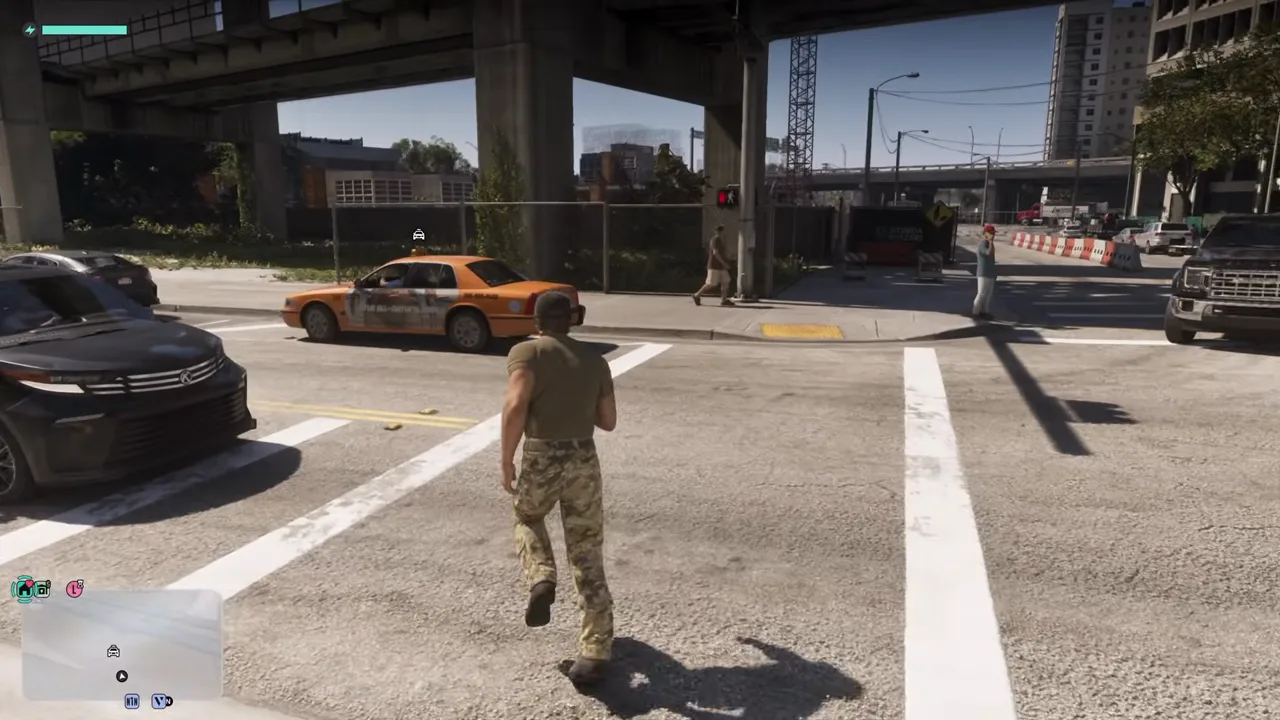
- Wait a few seconds. In the video an orange cab rounds the corner about ten seconds after the call, and a notification says the driver has arrived. The taxi does not warp to you: you walk to it.
- Get in the back. Press the door button, then confirm the trip from inside the cab.
What the taxi costs and where it fails
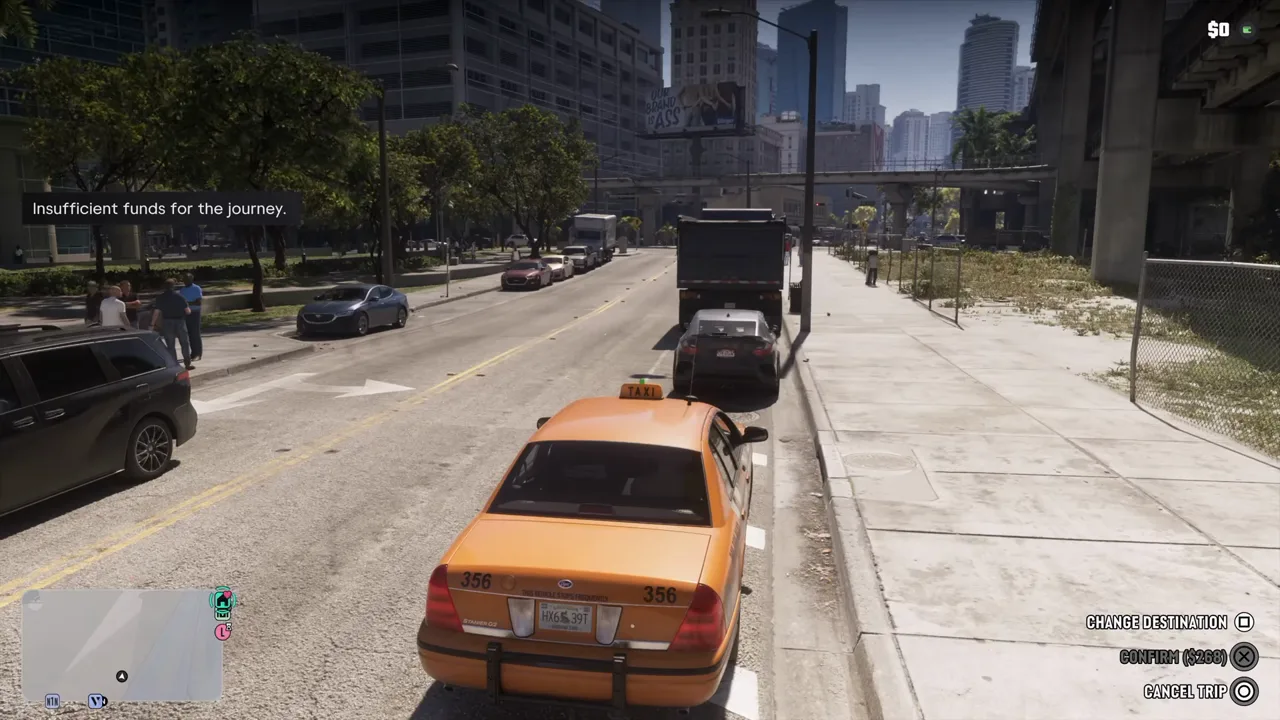
Inside the cab the screen offers three choices: change the destination, confirm the fare, or cancel the trip. For the long route in the video the fare reads $268. The video does not say whether the price grows with distance, only that this one trip costs that much.
The creator had no cash on him, so the confirm button was greyed out and the screen said there were insufficient funds for the journey. Money in the house stash did not count, which matters because early GTA 6 money is tight and a lot of it sits in stashes. The phone's message history also showed an older text in which the taxi firm had cancelled a ride, so a request can fall through.
How to use the RydeMe app (Chad Reddings)
Chad Reddings calls RydeMe the best fast travel method because it charges your bank account instead of the cash you carry. His clip shows these steps:
- Pull up the phone with the d-pad and open the RydeMe app.
- Pick where to go. The app offers three choices: Home, My Vehicle, or a new destination you place on the map. In the video Home is 757 ft away and the car is 465 ft away.
- Choose a ride tier. For a short trip to a tattoo shop the app lists a standard ride at $18 and a premium ride at $23.
- Book it. A maroon SUV pulls up, the arrival notice appears and you climb into the back.
- Hold the driver button. While you are in the car, a prompt lets you skip the trip for $100, talk to the driver, or tell them to hurry for $5. Choosing the skip fades out and drops you in front of the destination.
According to the creator, the $100 skip price stays the same whatever the distance. He also says a 20% discount on all RydeMe rides arrives once you have enough saved in your bank accounts, but he does not say how much that is, and the clip does not show the discount applying. Treat both claims as unconfirmed.
What to do before you ride
- Keep cash in your pocket for the taxi. The footage shows it refusing a fare you cannot pay from your wallet.
- Move money to your bank account for RydeMe. Imack's footage shows cash and stash behaving differently, and Chad's shows the bank paying. Our early money guide covers how players move cash into the BuckMe app.
- Set a map destination first. Both rides start from a marker you place yourself or from a saved place like Home.
- Expect a short wait. Cabs and SUVs in both clips arrived within seconds, but a cancelled ride is possible.
What the videos do not show
Neither clip shows a train or a bus. Other creators have published train and bus guides, including Kibbles Gaming, and we did not check those, so we make no claim about them. The videos also do not show what happens if you ride with a wanted level, whether skips are limited to certain places, or whether fares change across the map. If you know better, tell us through the correction link at the bottom.
Where this fits
Fast travel sits next to the other launch systems on our gameplay guide, including the controls in the controls guide, and the map is covered in the setting guide. For the full picture of what is confirmed and what is still reported, see everything we know about GTA 6. More footage-based pages live in the walkthrough hub. Rockstar's own page for the game is rockstargames.com/VI.
GTASIX.ORG is an unofficial fan site and is not affiliated with Rockstar Games or Take-Two. Prices and menus may change with patches, and a video shows one player's save, not every player's.
Spotted a mistake? Email support@gtasix.org with what's wrong and, if you can, a source or a video timestamp. We fix it and say on the page what changed.